
TypeScript エラーハンドリング実践パターン集
try-catch から Result 型まで、実務で使えるエラーハンドリング設計を解説。API・非同期処理・フォームバリデーションの実装例とベストプラクティスを網羅した実践ガイド。
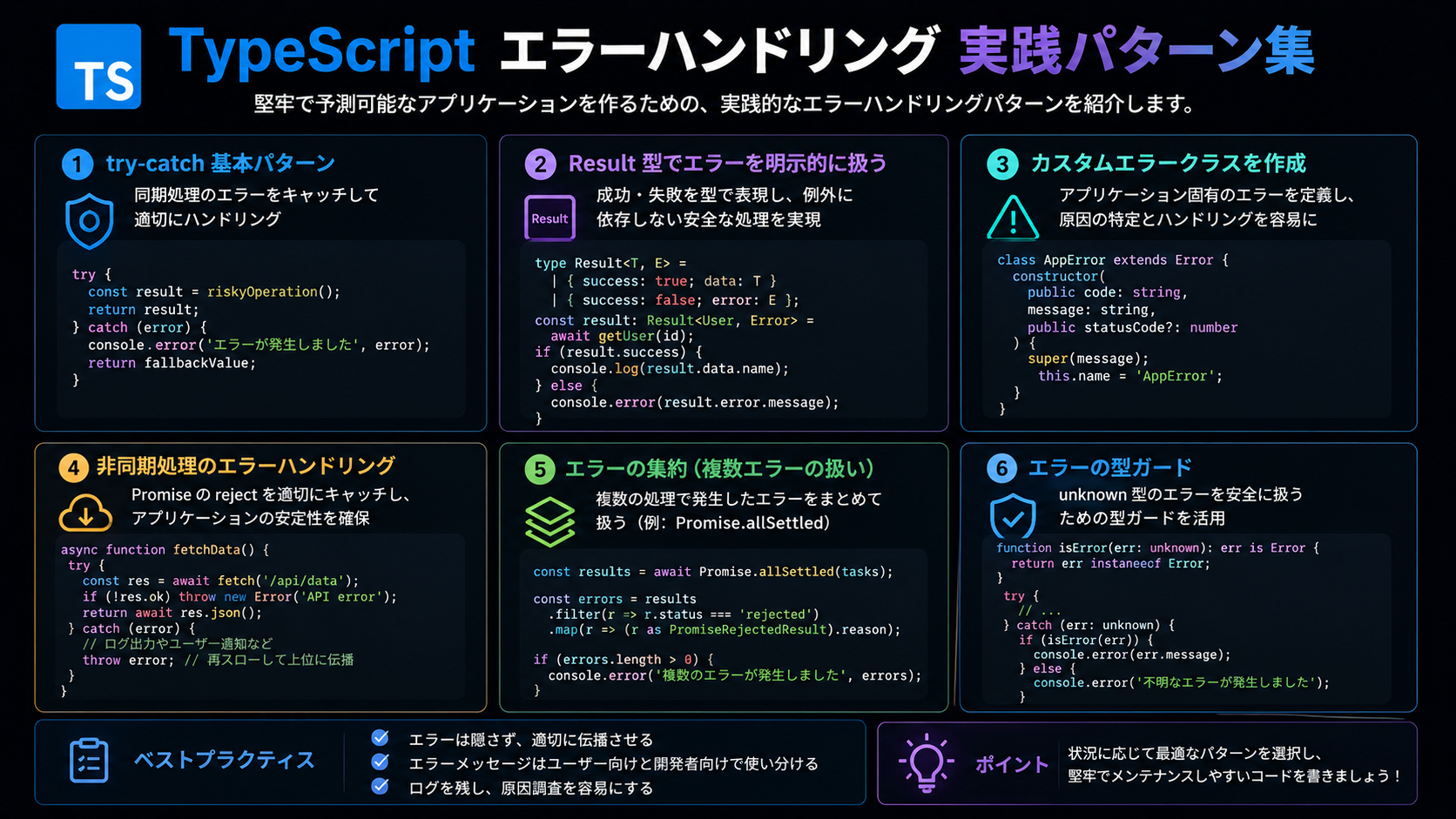
TypeScript エラーハンドリング実践パターン集
受託開発・自社開発の現場で頻繁に発生する「エラーをどう扱うか」の問題。try-catch だけでは不十分、かといって複雑すぎる設計は保守性を下げます。
本記事では、TypeScript でのエラーハンドリングを実務で即使えるパターンとして整理します。API 通信・非同期処理・フォームバリデーション・ドメインロジックそれぞれの場面で、どの手法を選ぶべきかを具体例とともに解説します。
1. エラーハンドリングの基本方針
1.1 エラーの分類
実務では、エラーを大きく 3 つに分類して扱います。
| エラー種別 | 説明 | 対処方法 | |----------|------|----------| | 予期されるエラー | バリデーション失敗、認証エラーなど | Result 型や Either で明示的に処理 | | 予期されないエラー | ネットワーク障害、外部 API の異常など | try-catch + ログ出力 + ユーザー通知 | | 致命的エラー | メモリ不足、重大な設定ミスなど | プロセス停止 + アラート |
1.2 基本原則
- 早期リターン: エラー時は早く return して、正常系を深くネストさせない
- 型で表現: エラーの可能性を型システムで明示する
- ログと通知の分離: 開発者向けログとユーザー向けメッセージを混同しない
- 一貫性: プロジェクト全体で同じパターンを使う
2. try-catch の適切な使い方
2.1 基本形
非同期処理や外部依存がある箇所では try-catch が必須です。
async function fetchUser(userId: string): Promise<User | null> {
  try {
    const response = await fetch(`/api/users/${userId}`);
    if (!response.ok) {
      // HTTP エラーは予期されるエラー
      console.warn(`Failed to fetch user: ${response.status}`);
      return null;
    }
    return await response.json();
  } catch (error) {
    // ネットワークエラーなど予期しないエラー
    console.error('Unexpected error in fetchUser:', error);
    return null;
  }
}
2.2 カスタムエラークラス
エラーの種類を判別しやすくするため、カスタムエラークラスを定義します。
class ApiError extends Error {
  constructor(
    message: string,
    public statusCode: number,
    public endpoint: string
  ) {
    super(message);
    this.name = 'ApiError';
  }
}

class ValidationError extends Error {
  constructor(
    message: string,
    public field: string
  ) {
    super(message);
    this.name = 'ValidationError';
  }
}

async function fetchUserSafe(userId: string): Promise<User> {
  try {
    const response = await fetch(`/api/users/${userId}`);
    if (!response.ok) {
      throw new ApiError(
        'Failed to fetch user',
        response.status,
        `/api/users/${userId}`
      );
    }
    return await response.json();
  } catch (error) {
    if (error instanceof ApiError) {
      // API エラーとして処理
      console.error(`API Error [${error.statusCode}]: ${error.message}`);
    }
    throw error; // 上位で処理させる
  }
}
2.3 try-catch のアンチパターン
❌ エラーを握りつぶす
// NG: エラーを無視
try {
  await saveData(data);
} catch (error) {
  // 何もしない
}
✅ 最低限のログは残す
try {
  await saveData(data);
} catch (error) {
  console.error('Failed to save data:', error);
  // ユーザーに通知する場合は適切なメッセージを
  throw new Error('データの保存に失敗しました');
}
3. Result 型パターン
3.1 Result 型の定義
関数型プログラミングでよく使われる Result 型を TypeScript で実装します。
type Result<T, E = Error> =
  | { success: true; value: T }
  | { success: false; error: E };

function ok<T>(value: T): Result<T, never> {
  return { success: true, value };
}

function err<E>(error: E): Result<never, E> {
  return { success: false, error };
}
3.2 実務での活用例
バリデーション
interface ValidationError {
  field: string;
  message: string;
}

function validateEmail(email: string): Result<string, ValidationError> {
  if (!email) {
    return err({ field: 'email', message: 'メールアドレスは必須です' });
  }
  if (!/^[^\s@]+@[^\s@]+\.[^\s@]+$/.test(email)) {
    return err({ field: 'email', message: 'メールアドレスの形式が不正です' });
  }
  return ok(email);
}

// 使用例
const result = validateEmail('test@example.com');
if (!result.success) {
  console.error(result.error.message);
  return;
}
console.log('Valid email:', result.value);
API 呼び出し
async function fetchUserResult(
  userId: string
): Promise<Result<User, ApiError>> {
  try {
    const response = await fetch(`/api/users/${userId}`);
    if (!response.ok) {
      return err(
        new ApiError(
          'Failed to fetch user',
          response.status,
          `/api/users/${userId}`
        )
      );
    }
    const data = await response.json();
    return ok(data);
  } catch (error) {
    return err(
      new ApiError(
        'Network error',
        0,
        `/api/users/${userId}`
      )
    );
  }
}

// 使用例
const userResult = await fetchUserResult('123');
if (!userResult.success) {
  console.error('API Error:', userResult.error.message);
  return;
}
const user = userResult.value;
3.3 Result 型のヘルパー関数
function map<T, U, E>(
  result: Result<T, E>,
  fn: (value: T) => U
): Result<U, E> {
  if (!result.success) return result;
  return ok(fn(result.value));
}

function flatMap<T, U, E>(
  result: Result<T, E>,
  fn: (value: T) => Result<U, E>
): Result<U, E> {
  if (!result.success) return result;
  return fn(result.value);
}

function unwrap<T, E>(result: Result<T, E>): T {
  if (!result.success) {
    throw result.error;
  }
  return result.value;
}

function unwrapOr<T, E>(result: Result<T, E>, defaultValue: T): T {
  return result.success ? result.value : defaultValue;
}
4. ドメインロジックでのエラー処理
4.1 ドメインエラーの設計
// ドメインエラーを定義
type DomainError =
  | { type: 'InvalidAge'; age: number }
  | { type: 'InvalidEmail'; email: string }
  | { type: 'UserNotFound'; userId: string };

class User {
  constructor(
    public readonly id: string,
    public readonly email: string,
    public readonly age: number
  ) {}

  static create(
    id: string,
    email: string,
    age: number
  ): Result<User, DomainError> {
    if (age < 0 || age > 120) {
      return err({ type: 'InvalidAge', age });
    }
    if (!/^[^\s@]+@[^\s@]+\.[^\s@]+$/.test(email)) {
      return err({ type: 'InvalidEmail', email });
    }
    return ok(new User(id, email, age));
  }
}
4.2 複数のバリデーションを組み合わせる
function validateUserInput(input: {
  email: string;
  age: number;
  name: string;
}): Result<{ email: string; age: number; name: string }, ValidationError[]> {
  const errors: ValidationError[] = [];

  if (!input.email) {
    errors.push({ field: 'email', message: 'メールアドレスは必須です' });
  } else if (!/^[^\s@]+@[^\s@]+\.[^\s@]+$/.test(input.email)) {
    errors.push({ field: 'email', message: 'メールアドレスの形式が不正です' });
  }

  if (input.age < 0 || input.age > 120) {
    errors.push({ field: 'age', message: '年齢は0〜120の範囲で入力してください' });
  }

  if (!input.name || input.name.trim().length === 0) {
    errors.push({ field: 'name', message: '名前は必須です' });
  }

  if (errors.length > 0) {
    return err(errors);
  }

  return ok(input);
}
5. 非同期処理のエラーハンドリング
5.1 Promise.allSettled の活用
複数の非同期処理を並列実行し、一部が失敗しても全体を続行したい場合。
async function fetchMultipleUsers(userIds: string[]): Promise<{
  succeeded: User[];
  failed: { userId: string; error: Error }[];
}> {
  const results = await Promise.allSettled(
    userIds.map(id => fetchUserSafe(id))
  );

  const succeeded: User[] = [];
  const failed: { userId: string; error: Error }[] = [];

  results.forEach((result, index) => {
    if (result.status === 'fulfilled') {
      succeeded.push(result.value);
    } else {
      failed.push({
        userId: userIds[index],
        error: result.reason,
      });
    }
  });

  return { succeeded, failed };
}
5.2 リトライロジック
async function fetchWithRetry<T>(
  fn: () => Promise<T>,
  maxRetries = 3,
  delayMs = 1000
): Promise<T> {
  let lastError: Error | null = null;

  for (let i = 0; i < maxRetries; i++) {
    try {
      return await fn();
    } catch (error) {
      lastError = error as Error;
      console.warn(`Retry ${i + 1}/${maxRetries} failed:`, error);
      if (i < maxRetries - 1) {
        await new Promise(resolve => setTimeout(resolve, delayMs));
      }
    }
  }

  throw lastError;
}

// 使用例
const user = await fetchWithRetry(() => fetchUserSafe('123'), 3, 2000);
6. React でのエラーハンドリング
6.1 Error Boundary
import { Component, ReactNode } from 'react';

interface Props {
  children: ReactNode;
  fallback?: ReactNode;
}

interface State {
  hasError: boolean;
  error: Error | null;
}

class ErrorBoundary extends Component<Props, State> {
  constructor(props: Props) {
    super(props);
    this.state = { hasError: false, error: null };
  }

  static getDerivedStateFromError(error: Error): State {
    return { hasError: true, error };
  }

  componentDidCatch(error: Error, errorInfo: React.ErrorInfo) {
    console.error('ErrorBoundary caught:', error, errorInfo);
    // エラー追跡サービスに送信
    // trackError(error, errorInfo);
  }

  render() {
    if (this.state.hasError) {
      return this.props.fallback || (
        <div>
          <h1>エラーが発生しました</h1>
          <p>{this.state.error?.message}</p>
        </div>
      );
    }

    return this.props.children;
  }
}
6.2 カスタムフック
import { useState, useCallback } from 'react';

function useAsync<T, E = Error>() {
  const [state, setState] = useState<{
    data: T | null;
    error: E | null;
    loading: boolean;
  }>({ data: null, error: null, loading: false });

  const execute = useCallback(async (asyncFn: () => Promise<T>) => {
    setState({ data: null, error: null, loading: true });
    try {
      const data = await asyncFn();
      setState({ data, error: null, loading: false });
      return data;
    } catch (error) {
      setState({ data: null, error: error as E, loading: false });
      throw error;
    }
  }, []);

  return { ...state, execute };
}

// 使用例
function UserProfile({ userId }: { userId: string }) {
  const { data: user, error, loading, execute } = useAsync<User>();

  useEffect(() => {
    execute(() => fetchUserSafe(userId));
  }, [userId, execute]);

  if (loading) return <div>読み込み中...</div>;
  if (error) return <div>エラー: {error.message}</div>;
  if (!user) return null;

  return <div>{user.name}</div>;
}
7. エラーハンドリングのベストプラクティス
7.1 チェックリスト
| 項目 | 説明 | |------|------| | エラーを握りつぶさない | 最低限のログは残す | | 型で表現する | Result 型や Union 型でエラーの可能性を明示 | | カスタムエラークラス | エラーの種類を判別しやすくする | | 早期リターン | エラー時は早く return | | ユーザー向けメッセージ | 技術的な詳細は隠し、わかりやすいメッセージを | | ログレベルの使い分け | error / warn / info を適切に | | リトライロジック | 一時的な障害に対応 | | 監視・アラート | 本番環境でのエラー追跡 |
7.2 実装パターン選定フローチャート
エラーは予期されるか?
├─ Yes → Result 型 or カスタムエラークラス
│         例: バリデーション、ビジネスルール違反
└─ No  → try-catch + ログ + 監視
          例: ネットワークエラー、外部 API 障害

エラーは複数発生するか?
├─ Yes → Result<T, E[]> or ValidationError[]
│         例: フォームバリデーション
└─ No  → Result<T, E> or throw Error
          例: 単一のバリデーション

エラーは上位で処理するか?
├─ Yes → throw Error or return Result
│         例: API レイヤーのエラー
└─ No  → try-catch で処理完結
          例: ローカルなエラー処理
7.3 ログ設計の例
enum LogLevel {
  ERROR = 'ERROR',
  WARN = 'WARN',
  INFO = 'INFO',
  DEBUG = 'DEBUG',
}

interface LogContext {
  userId?: string;
  requestId?: string;
  [key: string]: any;
}

class Logger {
  private log(level: LogLevel, message: string, context?: LogContext) {
    const timestamp = new Date().toISOString();
    const logEntry = {
      timestamp,
      level,
      message,
      ...context,
    };
    console.log(JSON.stringify(logEntry));
    // 本番環境では外部サービスに送信
  }

  error(message: string, error: Error, context?: LogContext) {
    this.log(LogLevel.ERROR, message, {
      ...context,
      error: {
        name: error.name,
        message: error.message,
        stack: error.stack,
      },
    });
  }

  warn(message: string, context?: LogContext) {
    this.log(LogLevel.WARN, message, context);
  }

  info(message: string, context?: LogContext) {
    this.log(LogLevel.INFO, message, context);
  }
}

const logger = new Logger();

// 使用例
try {
  await saveUser(user);
} catch (error) {
  logger.error('Failed to save user', error as Error, {
    userId: user.id,
    requestId: 'req-123',
  });
  throw error;
}
まとめ
TypeScript でのエラーハンドリングは、プロジェクトの規模や要件に応じて適切なパターンを選ぶことが重要です。
- 予期されるエラー: Result 型やカスタムエラークラスで型安全に
- 予期されないエラー: try-catch + ログ + 監視で確実に捕捉
- 複数のエラー: Result<T, E[]> で一度に返す
- 非同期処理: Promise.allSettled やリトライロジックで堅牢に
- React: Error Boundary とカスタムフックで UI と分離
本記事で紹介したパターンは、すべて実務ですぐに使えるものばかりです。プロジェクトの特性に合わせて、適切な組み合わせを選んでください。
Yureate では、TypeScript を使った堅牢な Web アプリ開発をサポートしています。エラーハンドリング設計や技術選定でお困りの際は、お気軽にご相談ください。